How people consent to our text messages
Mr. Peach is a personal-safety app. It only ever texts a user’s own trusted safety contacts, and only when that user needs help. Here is exactly how those recipients give consent.
The opt-in flow
- A person downloads Mr. Peach for their own safety (for example, when meeting someone new).
- In the app they add their own trusted friends or family as safety contacts: people who have agreed in person to be reached if the user needs help. The app states this requirement directly on the screen where contacts are added (shown below).
- Mr. Peach’s free plan never texts anyone from our number, not even the notice. Messages from the Mr. Peach number exist only on the paid Hands-free plan. The first time a person is a buddy on a Hands-free date, a one-time notice text is sent to them automatically from the Mr. Peach messaging number. It identifies the app and the user, says they will be texted only if the user may need help (never marketing), and tells them they can reply STOP to opt out or HELP for help. Consent is therefore established with our number before any alert is sent.
- After that, a contact only receives safety alerts: if the user starts a Hands-free date and then misses a safety check-in or sends a silent SOS, and a short all-clear message after an alert if the user is safe.
- A reply of STOP is honoured immediately and that person receives no further texts. Replying START turns messages back on.
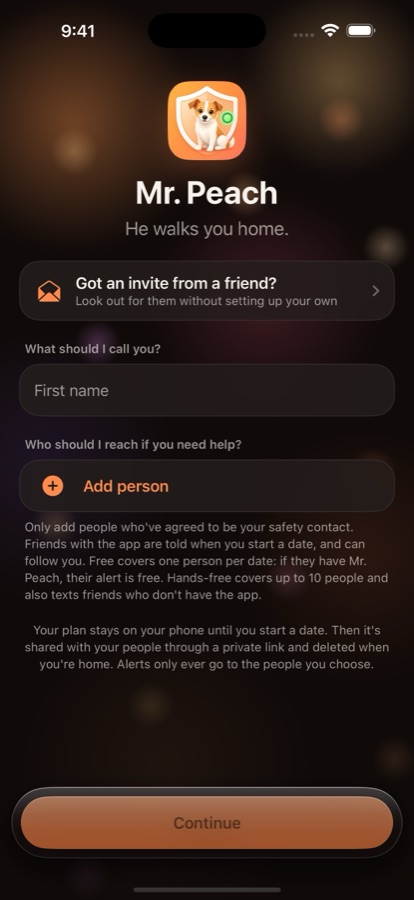
In-app screen where people are added: “Only add people who’ve agreed to be your safety contact.”
What a recipient receives
The first message from our number is the one-time opt-in confirmation, sent automatically the first time that person is a buddy on a Hands-free date:
After that, the only other messages are transactional safety alerts, sent only if the user misses a check-in or sends an SOS. Alerts use fixed wording plus the user’s first name and the meeting place and date name the user typed (cleaned; numbers and web addresses removed). A typical alert:
If the user later confirms they are safe, a short all-clear follows:
No marketing, ever
Mr. Peach never sends marketing, promotional, or recurring messages. Every message is a one-off safety alert or the all-clear that follows one.
Opting out
Recipients can reply STOP (or any reasonable “stop texting me”) at any time to stop all texts; it takes effect immediately. Mr. Peach never phones anyone. Reply START to turn messages back on. Reply HELP for assistance, or contact us at info@clovermedia.io.